
What is a Mind Map?
There’s a lot of planning that goes into building a website. One way to help organize all of your ideas is through mind mapping. It’s a great and simple way to brainstorm, organize information, and figure out how everything is gonna fit and work together before you actually start building the site.
A mind map is basically a way to organize your thoughts and ideas visually. Instead of making a long list, you start with one main idea in the middle and branch out into smaller ideas that connect to it.
How to Create a Mind Map
- 1. Start with your main idea. Write your website name or topic in the center.
- 2. Add branches for the main pages your website will need.
- 3. Break it down by adding smaller branches for the content you want on each page.
- 4. Move things around, add anything you missed, and make sure everything makes sense.
Example of a Mind Map
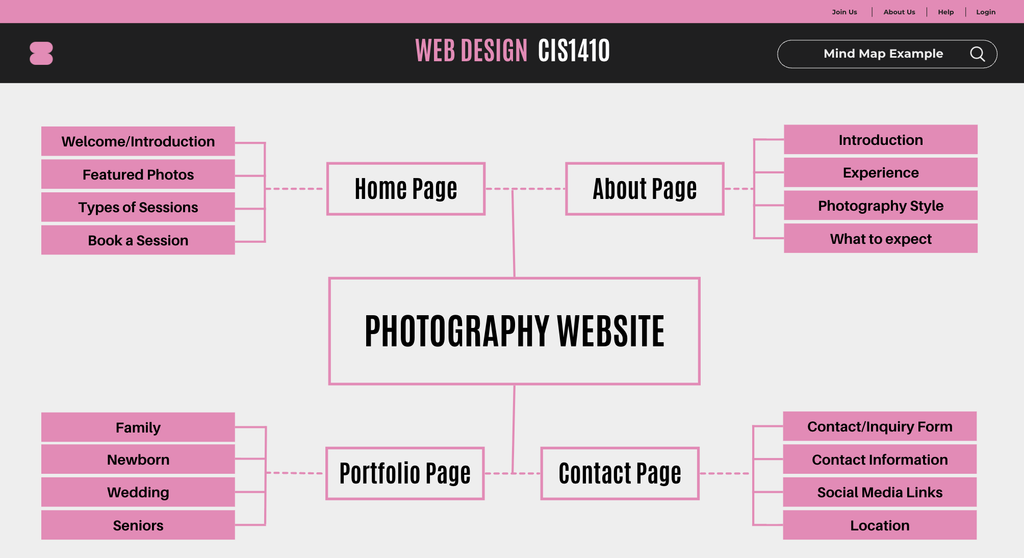
Let’s say you’re designing a website for a photography business. You could start with the business name in the center and then branch out into different pages like Home, About, Portfolio, and Contact. From there, you can break each page down even further.
I think this is a really helpful way to figure out what pages you need and what information should go on each one. It’s a lot easier to organize everything when you can actually see how it all connects.
Why is it Useful for Web Design?
In my opinion, I think being able to see all your ideas in one place makes it easier to figure out what pages you need, what information belongs on each page, and how everything connects. It also makes it much easier once you actually start working on the layout and build of the site.
I always prefer to start with the contact page, then the about, and work my way up to the home page. I feel like it’s easier to start with the more simple pages and work up from there. By the time I get to the home page, I usually have a better idea of the overall design, what information I want to highlight, and how I want everything to come together. Plus, most of the pages are already built by then, so I can add buttons and links on the homepage that take the visitors directly to those pages without having to go back and set everything up later.
I also think it would be really useful if you’re designing a website for someone else. Instead of just trying to explain how you’re planning to organize their website, you can actually show them. They can see what pages you’re planning to include, what information will go on each page, and how everything connects. It also gives them a chance to tell you if they want to add something or change things around before you’ve already spent a bunch of time building it.